This post is also available in: Indonesian

This post is also available in: Indonesian
Yeah, it sucks indeed, when you need Internet Explorer (IE) but suddenly IE cannot connect to the Internet, meanwhile Firefox, downloader like IDM, etc are able to connect. Of course since IE cannot connect, other applications depend on IE’s settings also unable to connect, such as Yahoo Messenger (YM).
Just knew this when this afternoon I tried to log in to YM but couldn’t, I thought I had problems due to Internet connection (slow or unstable connection). But this night when I tried to install Github Windows, an error occured with error message “Error: An error occurred trying to download ‘http://github-windows.s3.amazonaws.com/GitHub.application’.” After time consuming investigation, the cause was IE. Tried to open Google in IE, but no luck. What a weird, why IE unable to open Google while Firefox does able to.
After browsing around, few things that’s worth to try to fix this Internet connection problem in IE are:
Awal mula ketika siang tadi mencoba konek ke YM tidak bisa, saya kira karena masalah koneksi, tapi malam ini ketika mencoba install Github Windows ternyata tidak bisa. Selidik punya selidik ternyata ketika membuka IE, buka ke mbah Google saja tidak bisa. Aneh, padahal dengan Firefox bisa.
Setelah browsing ke sana kemari, beberapa cara yang patut dicoba untuk membenarkan koneksi Internet di Internet Explorer, antara lain:
-
Try using Diagnose/Troubleshoot Problems
First and easiest way, right click on Network icon in System Tray (near clock/volume in Taskbar) and choose Troubleshoot Problems.
-
Scan any malwares(viruses, trojans, worms, adwares, etc) by using anti virus, anti malware
In addition to anti virus such as Kaspersky, anti malware such as Malwarebytes Anti Malware, try also scanning using Hijack This or similar programs to investigate suspected or even dangerous programs.
-
Uninstall Norton/McAffee Anti Virus/Internet Security or similar programs with Firewall
Firewall is really useful to block network attacks, by blocking apps, IP, ports, but if we mistakenly choose to block/disallow important apps,ports, you will not be able to connect to the Internet. It is recommended to use Norton Removal Tool to uninstall Norton apps.
-
Resetting DNS, Winsock, IPv4 & IPv6 configuration
- Open Command Prompt with Run As Administrator, two simple ways:
- if you use Command Prompt frequently, then it will be shown up in Start Menu, just right click and choose Run As Administrator
- type
cmdin Start Menu > Search programs and files, aftercmd.exesearch result shown up, right click and choose Run As Administrator
- In Command Prompt, to reset DNS type
ipconfig /flushdnsand hit Enter - To reset Winsock, type
netsh winsock reset - To reset Internet Protocol, type
netsh int ip reset c:\resetlog.txt - Restart your computer

- Open Command Prompt with Run As Administrator, two simple ways:
-
Disable Proxy
There two ways to disable proxy, through Internet Options and Registry:
- To open Internet Options, in
Internet Explorer > Tools > Internet Options > Connections- For Dial Up (eg. using modem or VPN), in
Dial-up and Virtual Private Network settings click button Settings > uncheck all checkboxes - For LAN (eg. using cable or WiFi), in
Local Area Network (LAN) Settings >uncheck all checkboxes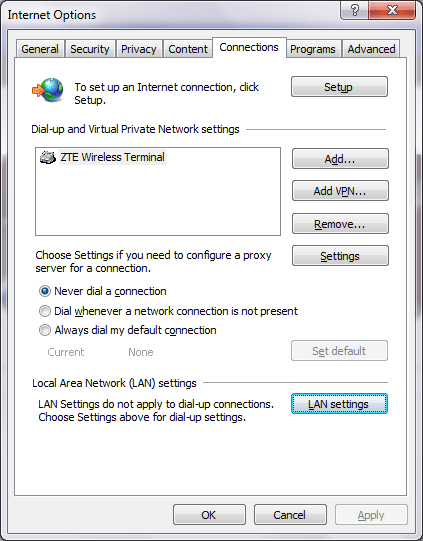
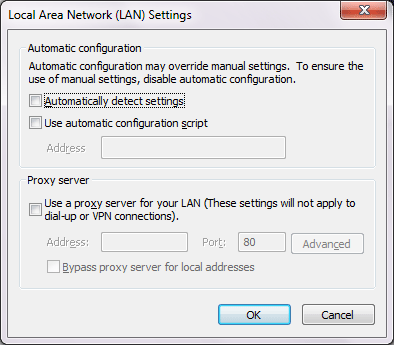
- For Dial Up (eg. using modem or VPN), in
- If through Internet Options is not working, try using Registry Editor:
- Close IE
- In Start > Run or Start Menu > Search programs and files, type
Regeditand hit Enter to open Registry Editor - Navigate to the following key
HKEY_CURRENT_USER\\Software\\Microsoft\\Windows\\CurrentVersion\\Internet Settings - Change key name
AutoConfigProxyto something else e.g.000AutoConfigProxy000 - Change the value of
ProxyEnableto 0 - Empty the value
Proxyserver(dont delet the key, just change the value to empty/blank) - Change the value of
MigrateProxyto 0 - Open IE
- To open Internet Options, in
- Use System Restore (not recommended)Use System Restore to restore Windows from your last backup (recently backed up). Remember that programs and their settings/configurations after last backup will be lost and replaced with the ones in the last backup, your documents/data still remain exist.
- Last extreme way and for those who are really desperate, reinstall Windows This last is really really not recommended, to fix one program you are not supposed to reinstall Windows. It’s just like Cara ini jelas sangat tidak disarankan, hanya untuk membenarkan satu program yang mengalami error kita harus menginstal ulang Windows. Ini sama saja dengan membunuh seekor semut dengan bom atom.
Dari cara di atas yang berhasil untuk saya adalah cara Mendisable Proxy sederhana memang tapi terkadang kalau kita tidak tahu atau lupa settingan jadinya ya repot juga. Sehari-hari saya menggunakan WiFi di rumah begitu juga di kantor (bisa kabel atau WiFi), berhubung sekarang menggunakan modem dial-up jadinya settingan yang tepat bukan di bagian Local Area Network (LAN) settings.
 Indonesia
 English


